Skip to content
Introduction
A UV printing machine is a digital printing system that uses ultraviolet (UV) light to cure specially formulated inks during the printing process. Unlike traditional printing methods that rely on evaporation or absorption to dry ink, UV printing uses UV light to harden the ink almost instantly, creating durable, high-quality printed images on a wide range of materials.
UV printing technology is widely used in advertising, packaging, promotional products, signage, electronics, and customized manufacturing. It allows businesses to print detailed graphics, vibrant colors, and fine text on materials such as acrylic, glass, wood, metal, plastic, and other suitable substrates.
For manufacturers, printing companies, and commercial buyers, understanding how a UV printing machine works is essential when evaluating equipment, comparing printing technologies, and selecting the right solution for production requirements.
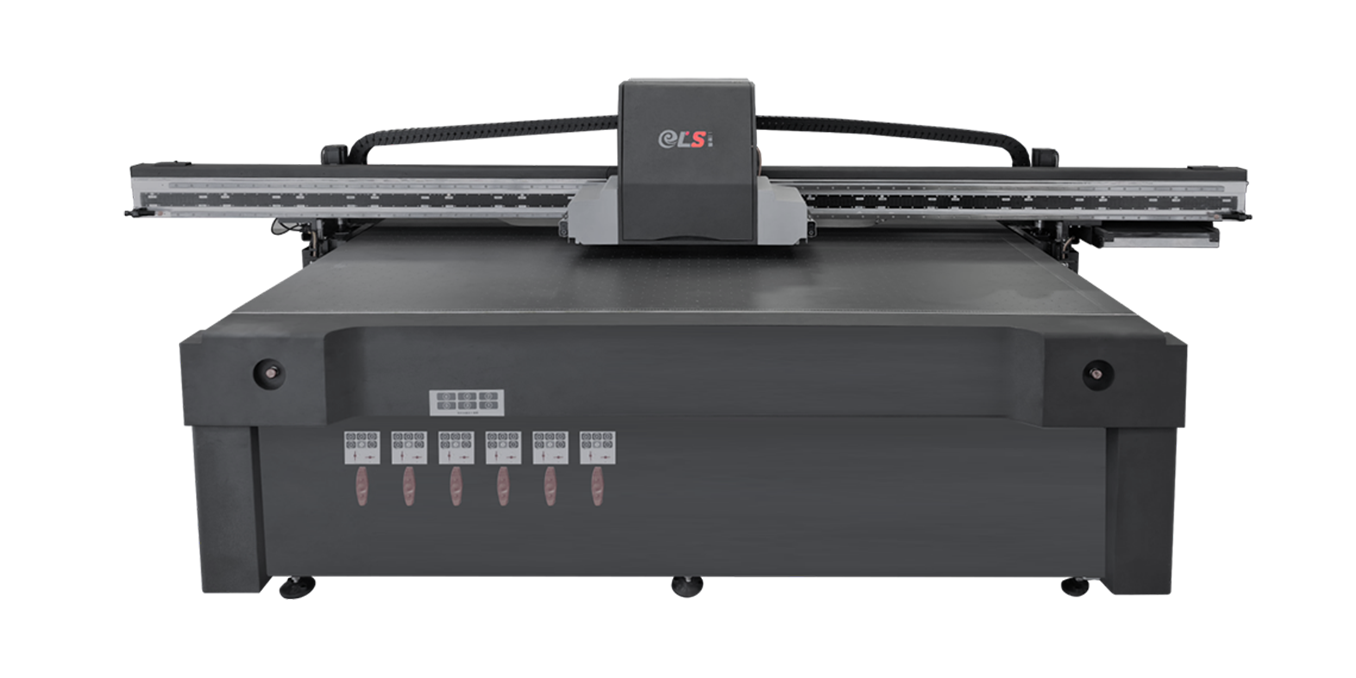
What Is a UV Printing Machine?
A UV printing machine is a digital printer equipped with a UV ink delivery system and ultraviolet curing lamps, typically using UV LED technology. During printing, the machine deposits UV-curable ink onto the surface of a material and exposes the ink to UV light, causing it to polymerize and form a solid ink layer.
This curing process enables the ink to dry rapidly without requiring extended drying time. It also helps produce sharp images, consistent color reproduction, and durable printed surfaces when the ink, substrate, and curing conditions are properly matched.
UV printing machines are available in several configurations, including flatbed, roll-to-roll, hybrid, and cylindrical printing systems. Each type is designed for different materials, product shapes, and production requirements.
For example, flatbed UV printers are suitable for rigid materials such as acrylic sheets, wooden panels, and metal plates. Roll-to-roll systems are designed for flexible media, including films, banners, and certain types of labels. Cylindrical UV printers can print directly onto compatible bottles, tubes, and other rounded objects.
How Does a UV Printing Machine Work?
The UV printing process combines digital image processing, precise ink deposition, and ultraviolet curing. Although machine designs vary, most UV printing systems follow several basic steps.
Prepare the Digital Design
The process begins with creating or importing a digital design. Operators use graphic design software and a raster image processor (RIP) to prepare the artwork, configure colors, adjust print dimensions, and set printing parameters.
The design is then transferred to the printer’s control system. Depending on the equipment and application, operators may also need to configure white ink, varnish, spot colors, or multiple print layers.
Correct file preparation helps ensure accurate image placement, consistent color output, and efficient material usage.
Load and Position the Printing Material
The substrate is placed on the printer’s worktable, feeding system, or dedicated fixture. The machine must position the material accurately to prevent image misalignment and maintain consistent print quality.
For flatbed UV printing machines, a vacuum table may hold rigid materials in place during printing. Roll-to-roll printers use feeding and tension-control systems to transport flexible media, while cylindrical printers use specialized fixtures or rotation mechanisms.
Before printing, operators should check the substrate’s dimensions, surface cleanliness, thickness, and compatibility with the selected ink. Some materials may require cleaning, surface treatment, or a suitable primer to improve ink adhesion.
Deposit UV-Curable Ink
The printhead deposits small droplets of UV-curable ink onto the substrate according to the digital design. Most modern UV digital printers use inkjet technology to control droplet placement and reproduce fine details.
Different ink channels can produce colors such as cyan, magenta, yellow, and black (CMYK). Depending on the machine configuration, additional channels may support white ink, light colors, or clear varnish.
White ink is particularly useful when printing on transparent, dark, or colored materials because it can provide an opaque base beneath the image. Clear varnish can be used to create selected gloss effects or additional surface texture.
The accuracy of ink droplet placement, printhead performance, and color management all influence the final image quality.
Cure the Ink with UV Light
After the ink is deposited, ultraviolet light activates the photoinitiators in the UV-curable ink, initiating a chemical polymerization process that transforms the liquid ink into a solid film.
Many machines use UV LED curing systems because they offer rapid curing, relatively low heat output, and long service life compared with some conventional UV lamp technologies. The actual performance depends on the curing system, ink formulation, wavelength, and operating conditions.
Unlike conventional solvent-based inks that may require significant evaporation time, properly cured UV ink can become touch-dry almost immediately. This reduces the waiting time between printing and subsequent handling or processing.
However, instant curing does not guarantee identical adhesion or durability on every substrate. The correct combination of ink, UV intensity, curing speed, and surface preparation remains important.
Inspect the Finished Print
Once printing and curing are complete, the finished product should be inspected for image clarity, color consistency, registration accuracy, ink adhesion, and surface defects.
For industrial applications, quality checks may also include abrasion resistance, chemical resistance, scratch resistance, and adhesion testing, depending on the end-use requirements.
If the print is intended for outdoor use, additional considerations include UV exposure, weather resistance, substrate stability, and the durability of the complete printing system. Appropriate ink selection and validated curing conditions help ensure that the finished product meets the intended performance standards.
What Are the Main Components of a UV Printing Machine?
The performance of a UV printing machine depends on the coordination of several major components.
Printhead
The printhead controls ink droplet placement and is one of the most important factors affecting image resolution, printing speed, and consistency. Printhead selection should match the required production volume, material type, ink formulation, and maintenance capabilities.
UV Ink System
The ink system stores, supplies, and distributes UV-curable ink to the printheads. Depending on the machine, it may include ink tanks, pumps, filters, circulation systems, and separate channels for white ink or varnish.
Stable ink delivery helps maintain consistent printing performance and reduces the risk of defects.
UV Curing System
The UV curing system provides the energy required to harden the deposited ink. Its wavelength, intensity, position, and synchronization with the printhead affect curing quality and production speed.
A well-matched curing system helps achieve reliable results while managing heat exposure and energy consumption.
Motion and Positioning System
The motion system controls the movement of the printhead, carriage, substrate, or printing platform. Accurate positioning is essential for image registration, repeatability, and consistent production.
Industrial machines may incorporate linear guides, servo motors, precision rails, vacuum tables, or automated feeding mechanisms.
Control Software
The control system coordinates printhead operation, motion, ink delivery, and curing. RIP software and color-management tools also help convert digital artwork into printable data and maintain consistent output across different jobs.
What Materials Can a UV Printing Machine Print On?
One of the main advantages of UV printing is its ability to print on many different substrates. However, compatibility depends on the machine configuration, ink type, surface properties, and required adhesion.
Common applications include:
Acrylic and plastics: Used for signs, display panels, promotional products, and customized plastic components.
Glass: Used for decorative panels, interior design products, glassware, and display applications when suitable ink and surface preparation are selected.
Metal: Used for nameplates, control panels, identification plates, and customized metal products.
Wood and MDF: Used for decorative boards, furniture panels, interior products, and personalized items.
Paper and packaging materials: Used for specialty packaging, prototypes, labels, and other compatible print applications.
Flexible films and media: Used for banners, graphics, and selected flexible packaging or labeling applications with compatible equipment.
Before selecting a UV printing machine, buyers should confirm the maximum substrate dimensions, material thickness, surface characteristics, ink compatibility, and required adhesion performance. Some applications may need pretreatment or primer, while certain substrates may be unsuitable without specialized equipment or testing.
What Are the Advantages of UV Printing Machines?
Fast Curing and Shorter Production Cycles
UV-curable ink hardens rapidly when exposed to the appropriate UV light. This can reduce drying delays and help businesses move printed products to inspection, finishing, or packaging more quickly.
High-Quality Image Output
Modern UV inkjet systems can reproduce detailed graphics, fine text, and vibrant colors. With suitable printheads, software, and calibration, they can support applications that require precise image placement and consistent results.
Versatile Material Compatibility
UV printing technology can support a wide variety of rigid and flexible substrates. This versatility allows manufacturers and print service providers to handle different products and customized orders using appropriately configured equipment.
Support for Customization and Short Runs
Digital UV printing eliminates the need for conventional printing plates in many applications. This makes it suitable for personalized products, short production runs, prototypes, and frequent design changes.
Reduced Drying Requirements
Because UV ink cures through a light-activated chemical process, the printing workflow can require less drying time than many conventional ink systems. Depending on the application, this may help reduce work-in-process inventory and simplify production planning.
Nevertheless, operating costs, ink consumption, maintenance, energy use, and pretreatment requirements should all be evaluated when comparing printing technologies.
UV Printing Machine vs. Traditional Printing
UV printing and traditional printing methods differ in their ink systems, curing or drying processes, setup requirements, and ideal applications.
| Comparison Factor | UV Printing Machine | Traditional Printing Methods |
| Ink curing or drying | UV light cures specially formulated ink | May rely on evaporation, absorption, heat, or other curing methods |
| Material compatibility | Supports many suitable rigid and flexible substrates | Depends on the specific printing technology and ink |
| Production setup | Often suitable for digital, on-demand jobs | Some methods require plates, screens, or other job-specific setup |
| Customization | Convenient for variable designs and short runs | Can be effective for repeat production and specialized applications |
| Finishing time | Rapid ink curing can reduce waiting time | Drying or curing time varies by process |
| Initial investment | Depends on printer type, size, and configuration | Varies widely by printing technology and production scale |
Neither technology is universally better. UV printing is often attractive for direct-to-substrate printing, customization, and short-to-medium production runs. Traditional methods may be more economical for certain high-volume jobs or applications requiring specific ink properties and established production workflows.
The best choice depends on product specifications, production volume, material compatibility, quality requirements, and total operating cost.
How to Choose the Right UV Printing Machine
Selecting the right equipment requires more than comparing advertised printing speeds or purchase prices. Buyers should evaluate the machine against their actual production needs.
Identify Your Main Printing Applications
Determine whether you primarily print rigid sheets, flexible rolls, cylindrical objects, or finished products with irregular shapes. The intended application helps narrow the choice between flatbed, roll-to-roll, hybrid, and specialized UV printing systems.
Check Print Size and Material Thickness
Confirm the maximum printing width, length, height, and substrate thickness supported by the machine. For rigid materials, also consider table dimensions, loading methods, and workpiece weight.
Evaluate Print Quality and Production Speed
Review the required resolution, color consistency, printhead configuration, and realistic production throughput. Ask suppliers for sample prints using your own materials and artwork rather than relying solely on theoretical specifications.
Confirm Ink and Curing Compatibility
Make sure the ink and UV curing system are appropriate for your substrates and end-use conditions. If adhesion, scratch resistance, outdoor durability, or chemical resistance is critical, request application-specific testing.
Compare Maintenance and Operating Costs
Consider ink consumption, printhead replacement, routine maintenance, energy use, software costs, spare parts, and technical support. A lower purchase price may not represent the lowest total cost of ownership.
Assess Supplier Support and Customization
For industrial buyers and distributors, supplier reliability is an important purchasing factor. Evaluate installation and training services, warranty terms, spare-parts availability, response times, and the supplier’s ability to configure the machine for your production requirements.
Common UV Printing Problems and How to Prevent Them
Although UV printing machines can deliver consistent results, incorrect setup or maintenance may lead to print defects.
Poor ink adhesion may result from surface contamination, incompatible ink, insufficient surface energy, or unsuitable curing conditions. Cleaning, material testing, appropriate pretreatment, and verified curing parameters can help improve adhesion.
Banding or uneven color may be associated with blocked nozzles, incorrect printhead alignment, inconsistent media movement, or unsuitable printing settings. Regular nozzle checks, calibration, and mechanical inspections can help identify the cause.
Incomplete curing or surface defects may occur when UV intensity, lamp condition, ink formulation, or printing speed is not properly matched. Follow the manufacturer’s recommended operating parameters and verify curing performance for the specific application.
Frequent nozzle clogging can be related to inadequate maintenance, unsuitable storage conditions, or interruptions in ink circulation. Follow the equipment manufacturer’s cleaning and maintenance procedures, particularly for systems using white ink.
A consistent maintenance schedule and documented production settings can reduce avoidable downtime and help maintain print quality.
Conclusion
A UV printing machine uses digital inkjet technology and ultraviolet light to produce printed images that cure rapidly on a wide range of compatible materials. By combining precise ink deposition with UV curing, it supports high-quality graphics, customization, and efficient production across advertising, packaging, industrial marking, and specialty manufacturing.
For businesses considering UV printing equipment, the most important factors are application requirements, substrate compatibility, print quality, production capacity, curing performance, and long-term operating costs. Testing the machine with actual materials and reviewing the supplier’s technical support capabilities can help buyers make a more informed investment decision.
Choosing the right UV printing machine enables businesses to expand their printing capabilities, improve workflow flexibility, and meet changing customer requirements.