Skip to content
Introduction
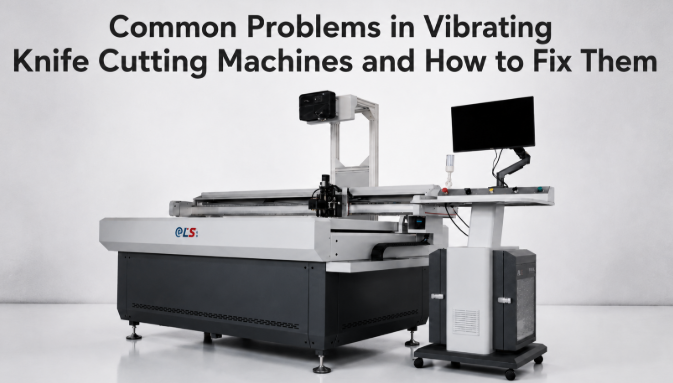
A vibrating knife cutting machine is a reliable workhorse on a cutting floor — but like any CNC equipment, it develops predictable faults once blades dull, filters clog, or software settings drift. Most “breakdowns” that halt production are actually simple, repeatable issues that an operator can diagnose in under ten minutes if they know what to look for.
This guide breaks down the seven most frequent problems production teams report — from cutting accuracy drift to motor overheating and nesting software crashes — and gives you the exact fix for each, plus a preventive maintenance schedule you can hand to your floor supervisor. If you cut leather, foam, cardboard, or textiles, bookmark this page; it will save you more unplanned downtime than any single spare part.
Inaccurate or Uneven Cuts
Symptom: cut pieces do not match the CAD pattern, edges are offset, or repeated pieces vary from one another.
Likely causes: a dull or wrong-type blade, loose drive belt, a machine that has fallen out of calibration, or insufficient vacuum holding the material flat during the cut.
How to fix: replace the blade with the correct type for your material, re-tension the drive belt, and run a calibration test cut to confirm ±0.1 mm cutting accuracy. On leather-heavy operations, the ELS 3016S vibrating knife genuine leather cutting machine holds ±0.1 mm via a ball-screw servo drive — if your machine cannot hold that tolerance after calibration, the drive system itself may need service.
Material Slipping or Shifting During Cutting
Symptom: the material creeps or lifts mid-cut, producing misaligned or doubled cutting lines.
Likely causes: clogged vacuum filters, a weak or failing vacuum pump, warped sheet material, or the wrong hold-down configuration for the material weight.
How to fix: clean or replace the vacuum filters (see schedule below), verify pump suction at the table, pre-flatten warped sheets before loading, and confirm the correct vacuum zones are switched on for your sheet size. If the material still shifts on thick foam, check that the Z-axis clearance matches the material thickness.
Blade Wears Out Too Quickly
Symptom: you are replacing blades far more often than the expected 2–4 week interval, and cutting cost is climbing.
Likely causes: an abrasive material (rubber, composites, fiberglass-backed fabric), the wrong blade material, oscillation frequency set too high, or feed speed too fast for the blade load.
How to fix: switch to tungsten carbide blades for abrasive materials, lower the oscillation frequency to the manufacturer’s recommended range, and slow the feed speed. On dual-head machines, alternate blades between heads so wear is distributed — the ELS-B2S sample cutting machine uses dual-head punching that spreads tool wear across stations.
Rough, Torn, or Frayed Edges
Symptom: edges come out fuzzy, torn, or with material pulling away from the cut line instead of a clean slice.
Likely causes: a blade that is too dull, oscillation frequency set too low for the material, feed speed too high, or the wrong blade geometry for thin stiff materials.
How to fix: replace or sharpen the blade, raise the oscillation frequency, and reduce feed speed until the edge is clean. For thin, stiff materials like vinyl or thin cardboard, switch to a tangential drag knife, which rotates to follow curves without distorting the material. Always match blade angle to material density.
Machine Overheating or Motor Stalling
Symptom: the servo motor trips a warning, slows down, or the machine stops mid-job.
Likely causes: cutting material thicker than the rated maximum, dust buildup around the drive, poor ventilation, or running continuously beyond the rated duty cycle.
How to fix: confirm material thickness is within the machine’s rated range, clean dust from the linear guides and motor housing, improve workshop airflow, and respect the duty cycle. A rigid all-steel frame — as used on the CNC Engraving Machine HH-6090 with 0.01 mm repeat positioning — resists the vibration and heat that accelerate motor load, so frame condition matters more than operators expect.
Nesting Software Errors or DXF/PLT Import Failures
Symptom: a DXF or PLT file will not import, the nesting layout crashes, or the cut path is missing geometry.
Likely causes: an unsupported or newer CAD format, a corrupted export, a version mismatch between design software and the nesting program, or a file too large for the current memory allocation.
How to fix: re-export the design as DXF R12 or PLT — the two formats industrial machines accept most reliably — validate the file opens in a standalone viewer, update the nesting software to the latest build, and split very large multi-order nests into smaller batches. Most machines also accept AI, EPS, PDF, and JPG, but vector formats (DXF/PLT) preserve exact geometry.
Poor Vacuum Hold-Down or Weak Suction
Symptom: suction is weak even on flat material, corners lift, and cut quality degrades across the whole sheet.
Likely causes: clogged filters (the most common cause), leaking table gaskets or seals, a failing pump, or the wrong vacuum zones left closed for the sheet size.
How to fix: replace the filters first — this alone resolves most weak-suction complaints. Then inspect table gaskets and seals for air leaks, verify pump performance against the spec, and open the vacuum zones that match your material dimensions. For continuous-feed production, the channel-type ELS-B13S pairs consistent vacuum hold-down with 20-megapixel camera vision positioning to keep pre-printed materials registered correctly.
Preventive Maintenance Schedule
Most of the seven problems above are preventable with a simple routine. Print this schedule and post it at the machine. Following it keeps annual consumable costs between $1,000 and $3,000 for a single-head machine.
| Interval | Task | Why It Matters |
|---|---|---|
| Daily | Clean cutting area; inspect blade; check vacuum suction | Prevents Problems 1, 2, 4 |
| Weekly | Replace/clean vacuum filters; wipe linear guides | Prevents Problems 2, 7 |
| Monthly | Lubricate guides and ball screws; check belt tension | Prevents Problems 1, 5 |
| Quarterly | Calibrate vision system; update nesting software; inspect punch pins | Prevents Problems 6, 3 |
| Annually | Full service; drive calibration; pump overhaul | Sustains overall accuracy & uptime |
Still Stuck? Get Free Technical Support
Send us a photo or short video of the fault and your machine model. Our engineers will diagnose the cause and send a step-by-step fix — no obligation, no cost.
FAQs
How do you maintain a vibrating knife cutting machine?
Follow a daily-to-annual schedule: clean the cutting area and inspect the blade daily; replace vacuum filters and wipe linear guides weekly; lubricate ball screws and check belt tension monthly; calibrate the vision system and update nesting software quarterly; and book a full service with drive calibration annually. This routine keeps consumable costs at $1,000–3,000 per year for a single-head machine and prevents the seven most common faults.
How long does a vibrating knife blade last?
On genuine leather, a blade typically lasts 2–4 weeks of single-shift operation. Foam and cardboard are less abrasive, extending life to 4–8 weeks. Rubber and composites may shorten it to 1–2 weeks. Most machines use standard tungsten carbide blades costing $15–40 each. Dual-head machines alternate wear and roughly double the interval between changes.
Is a vibrating knife cutting machine hard to operate?
No. A 7-inch touchscreen with icon-based navigation lets a new operator reach independent operation in 1–2 hours — importing a DXF file, running the nesting layout, and starting a cut. The nesting algorithm arranges patterns automatically, so no pattern-cutting expertise is needed. Advanced functions like defect-zone avoidance and multi-order batching take about a day of additional training.
How accurate is a vibrating knife cutting machine?
Industrial machines achieve cutting accuracy of ±0.1 mm and repeat positioning accuracy of 0.01 mm with ball-screw drives, servo motors, and rigid welded frames. Real-world accuracy can drop on stretchy fabrics or thick foam where material shifts, which is why vacuum hold-down and material-specific blade selection matter as much as the stated tolerance.
Why is my vibrating knife cutting machine cutting inaccurately?
The usual culprits are a dull blade, a loose drive belt, loss of calibration, or weak vacuum letting the material shift. Fix it by replacing the blade, re-tensioning the belt, running a calibration cut to confirm ±0.1 mm, and strengthening vacuum hold-down. If accuracy does not return after calibration, the drive system or frame may need service.
Why does my vibrating knife cutting machine overheat?
Overheating is usually caused by cutting material thicker than the rated maximum, dust buildup around the motor, poor ventilation, or running beyond the duty cycle. Reduce material thickness to spec, clean the drive and motor housing, improve airflow, and respect rest intervals. A rigid all-steel frame resists the vibration and heat that accelerate motor load.
How do you replace a vibrating knife blade?
Power down and lock the tool head, loosen the blade clamp with the supplied wrench, remove the worn blade, insert the correct tungsten carbide blade for your material, tighten the clamp to the specified torque, and run a single test cut to confirm edge quality. Always wear cut-resistant gloves and keep spare blades on hand — blade changes are the single most frequent maintenance task.
What file formats do vibrating knife cutting machines support?
Most machines accept DXF, PLT, AI, EPS, PDF, and JPG. DXF and PLT are the most reliable for vector cutting paths because they preserve exact geometry — re-export as DXF R12 or PLT if a newer format fails to import. Some machines also support HPT and ST2 proprietary formats. Avoid machines that require paid file-conversion software, as this adds recurring cost.
How often should I clean the vacuum filters?
Clean or replace vacuum filters weekly under normal production, and more often in dusty environments (leather dust, foam particles, cardboard fibre). Clogged filters are the number-one cause of weak suction and material shifting — both of which directly degrade cut accuracy. Inspect the filter housing during the weekly wipe-down of the linear guides.
Can I cut thick foam with a vibrating knife cutting machine?
Yes. Vibrating knife machines cut EVA and PE foam up to 50 mm thick when the Z-axis clearance and beam height are sized for it. The key is matching blade length and oscillation frequency to foam density, and ensuring the vacuum table holds the sheet flat. Cutting foam beyond the rated thickness is a frequent cause of motor overheating, so stay within the machine’s specified maximum.
Conclusion
The seven common problems — inaccurate cuts, material slipping, fast blade wear, torn edges, motor overheating, software import errors, and weak vacuum — share one root cause: deferred basic maintenance. Replace blades on schedule, clean vacuum filters weekly, recalibrate to ±0.1 mm when accuracy drifts, and export files as DXF R12 or PLT, and your machine will run at spec for years. When a fault does appear, the fix is usually a ten-minute task, not a service call.
If you have hit a problem this guide does not cover, contact Hanhai Tech with a photo or short video and our engineers will diagnose it free of charge.
Related Resources
- The Complete Guide to Oscillating Knife Cutting Machines — blade types, accuracy, and material-specific setups in depth.
- How Hanhai Powers the Smart Factories of 2026 — how sensor feedback and predictive maintenance reduce unplanned downtime.
- CNC Leather Cutting Machine Category — leather-specific cutting and nesting solutions.
- Laser Cutting Machine Category — compare laser options for materials needing sealed edges or engraving.
Recommended Products
- ELS 3016S Vibrating Knife Genuine Leather Cutting Machine — ±0.1 mm accuracy with ball-screw servo drive and intelligent leather nesting.
- ELS B6616S CNC Flexible Leather Material Cutting Machine — 6000 × 1600 mm workspace with automatic intelligent layout for high-volume production.
- Intelligent Sample Cutting Machine ELS-B2S — dual-head punching that distributes tool wear for lower blade cost.
- Channel Type Intelligent Cutting Machine ELS-B13S — 20-megapixel vision positioning with consistent vacuum hold-down for pre-printed materials.